


Let's talk about Load balacers (Part 1)
In this AI era, where even Linus vibe coding, we need to rely on the fundamentals because that's what was left for the betas

Hey, welcome to Part 2. If you missed Part 1, go back and read it, I won’t judge you, but the context will make a lot more sense. Now it’s time to talk about why you actually care, the real-world use cases that make load balancing one of those things you don’t notice until it’s gone.
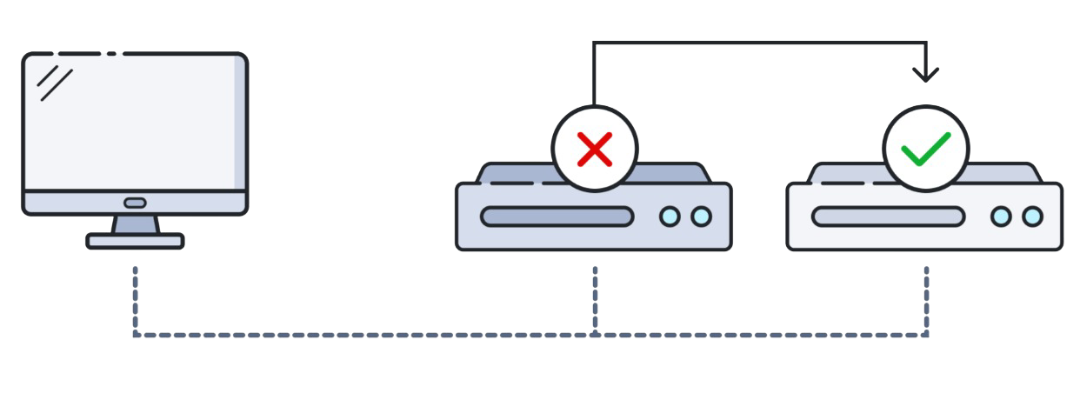
The traffic is distributed and designed to keep running
Imagine your application is running on a single server, everything is fine, until it isn’t. One hardware failure, one memory leak, one wrong deployment, and your users get a lovely 502 error page. That’s the nightmare load balancers were built to prevent.
With High Availability, traffic is distributed across multiple servers. If one goes down, the LB detects it through health checks and stops routing requests to it, yeah, no phone calls at 3 AM, no panic, no post-mortem with 30 people trying to explain what happened.
Fault Tolerance takes this further: the system is designed not just to survive failures, but to keep running seamlessly while they’re being fixed. The LB becomes the bouncer that quietly removes the drunk server from the pool without anyone at the party noticing.
This is how you go from handling 1,000 requests per second to 100,000 without breaking a sweat or your budget. The LB doesn’t care if you have 2 servers or 200, it just keeps distributing. Auto-scaling groups in cloud environments take this even further, spinning up new instances during traffic spikes and killing them when demand drops. The load balancer adapts accordingly, no reconfig needed.
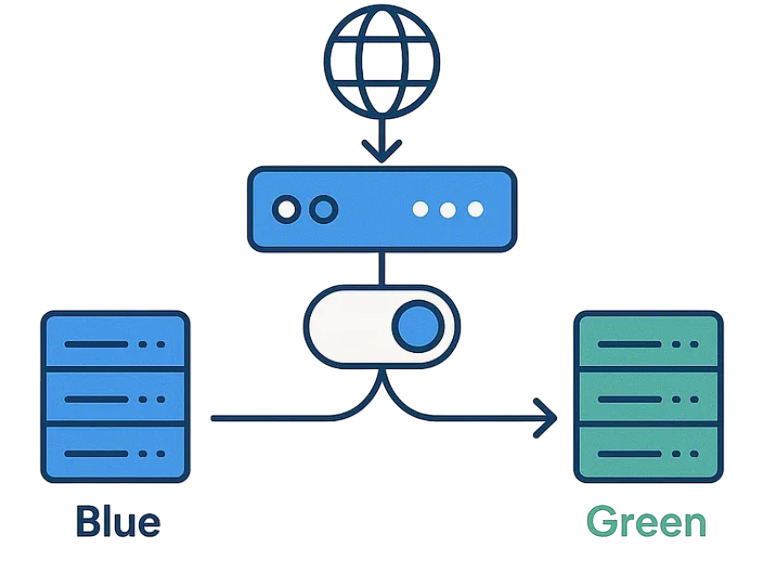
To keep the on-call engineer sanity
Deploying new versions of your app used to mean a maintenance window, an angry email to users, and a prayer that the new code worked. Load balancers made that whole ritual obsolete.
With strategies like rolling deployments or blue-green deployments, you gradually shift traffic from the old version to the new one. The LB routes a percentage of users to the new servers while keeping the rest on the stable version. If something blows up, you roll back instantly, users barely notice, your SLA survives, and your on-call engineer keeps their sanity. It’s the difference between “scheduled maintenance at 2 AM” and “we just shipped a new feature and nobody noticed.”
A load balancer sitting at the edge of your infrastructure is actually a decent first line of defense. By acting as a reverse proxy with steroids, it hides your backend servers from direct public exposure, so, attackers can’t target what they can’t see.
Beyond obscurity, LBs can help absorb and spread out DDoS attacks by distributing malicious traffic across multiple servers instead of letting it hammer one. Rate limiting, connection throttling, and IP-based filtering can be applied at the LB level before a single request reaches your application layer. It won’t replace a proper WAF or a dedicated DDoS protection service, but it adds a meaningful layer of protection without extra complexity in your backend.
Every HTTPS request needs to be decrypted before your application can process it. SSL/TLS decryption is computationally expensive, and if you let each backend server handle it individually, you’re burning CPU cycles that could be used for actual work.
SSL Termination offloads that decryption to the load balancer. The LB handles the handshake, decrypts the traffic, then forwards plain HTTP (or re-encrypted traffic in SSL passthrough scenarios) to the backend. This centralizes certificate management, one cert to renew, one place to update, zero chance of accidentally leaving an expired cert on server number seven of twelve. Your backend servers get to focus on what they’re actually good at.
Not all load balancers are the same. Choosing the wrong type is like bringing a Formula 1 car to go grocery shopping, technically it works, but you’ll be miserable. Here’s what’s out there and when each one makes sense.

Time to make a mess, no, time to make a choice
Before software-defined everything, if you wanted to load balance at scale, you bought a physical appliance, a dedicated box from vendors like Citrix that sat in your data center rack and handled traffic at wire speed.
The upside? Blazing performance, purpose-built hardware, and very predictable behavior. The downside? Price tags that make your CFO cry, limited flexibility, long procurement cycles, and zero elasticity. If traffic spikes unexpectedly, you can’t just “add more” hardware overnight. These days hardware LBs are mostly found in large enterprises, financial institutions, and telcos where raw throughput and regulatory requirements justify the cost.
Software load balancers run on commodity servers or VMs, giving you all the core functionality without being locked into specific hardware. Tools like NGINX, HAProxy, and Envoy fall into this category — battle-tested, highly configurable, and very much alive in production environments everywhere.

The tradeoff compared to hardware is that performance is bound by the underlying machine, but in most cases that ceiling is way higher than your actual needs. Software LBs are flexible, cheap to scale, and easy to automate. They’re also the foundation of most modern infrastructure stacks — if you’ve ever deployed anything with Kubernetes, you’ve already been using one.
You’re probably already using one of these. AWS ALB/NLB, Azure Load Balancer, Azure Application Gateway, GCP Cloud Load Balancing, managed services where the cloud provider handles the infrastructure so you don’t have to.
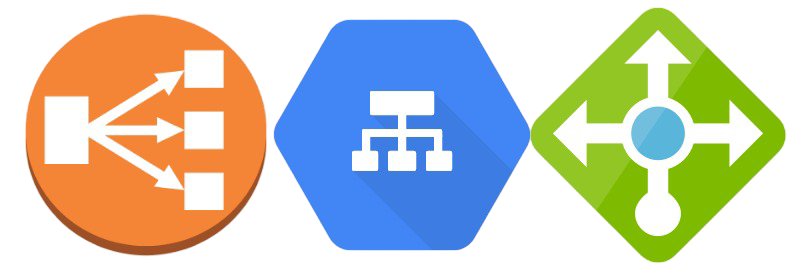
The beauty here is that you configure, not operate. No patching, no capacity planning for the LB itself, built-in integration with auto-scaling groups and health checks, and you pay for what you use. The downside is that you’re trading control for convenience — advanced tuning options are limited compared to running your own NGINX, and vendor lock-in is real. For most cloud-native workloads though, this is the right default choice.
Regular load balancing distributes traffic across servers in a single location. GSLB does the same thing, but across multiple geographic regions or data centers. When a user in Tokyo hits your app, GSLB can intelligently route them to your Asia-Pacific cluster instead of your US-East servers, reducing latency significantly.

It typically relies on DNS-based routing combined with health awareness, if your EU data center goes dark, GSLB stops sending European users there and redirects them elsewhere. Think of it as load balancing at the planetary level. Azure Traffic Manager and AWS Route 53 are common implementations. It’s overkill for a startup, essential for anything that calls itself “globally available.”
Some environments can’t choose between on-premises hardware and cloud — they’re stuck running both, either permanently or during a migration phase. Hybrid Load Balancing bridges those two worlds, distributing traffic across on-prem servers and cloud instances as if they were part of the same pool.
This is more of an architecture pattern than a specific product. It lets organizations gradually migrate workloads to the cloud without a hard cutover, or keep sensitive workloads on-prem while bursting to the cloud during peak demand. The operational complexity is real, you’re managing two different environments simultaneously, but for enterprises mid-migration, it’s often the pragmatic choice.
Now we’re getting into the OSI model territory, which means you’ll want to bookmark this for your next interview.
Here the load balancing makes routing decisions based on network-level information: source IP, destination IP, TCP/UDP port. It doesn’t look inside the packet — it just sees the envelope and decides which server gets it.
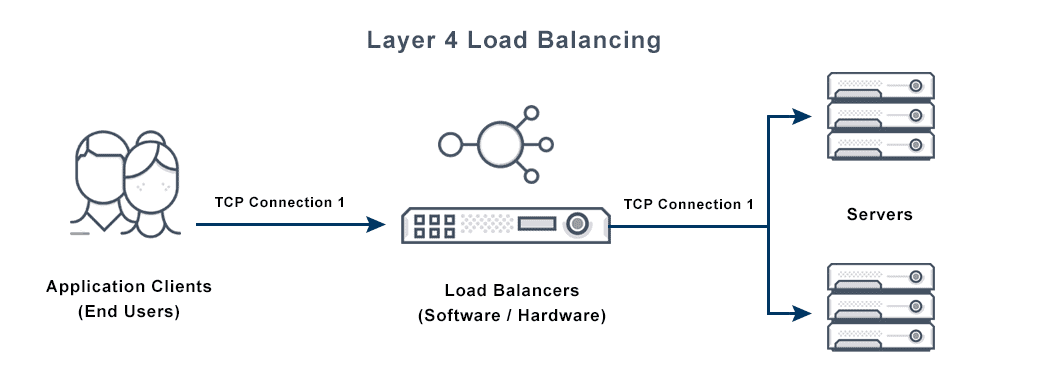
The result is extremely fast and efficient routing with minimal overhead. But because it operates blindly at the transport level, it can’t make smart decisions based on content, it doesn’t know if the request is for /api/users or /api/payments, it just sees a TCP connection. Use this when raw throughput matters more than request-level intelligence, like database connections, gaming servers, or any non-HTTP protocol.
Here is where things get interesting. The LB actually reads the HTTP request, headers, URL path, cookies, query parameters, even the request body, and makes routing decisions based on that content.
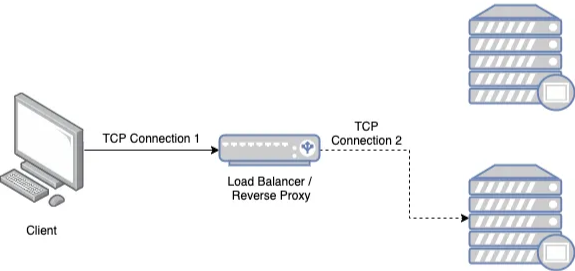
This is what enables things like: routing /api/* traffic to your backend cluster and /static/* to a CDN, sticky sessions based on a cookie value, A/B testing by splitting traffic based on a header, or canary deployments where 5% of users get the new version. It’s smarter, more flexible, and more powerful than L4, but it comes with higher CPU overhead since every packet needs to be inspected.
For most modern web applications, L7 is the right choice. For raw throughput at the network level, L4 wins.
This distinction matters more than people realize, especially once you have to debug a session issue in production at the worst possible time.
In stateless load balancing, the LB has no memory of past requests. Every incoming request is treated independently, routed to whatever server the algorithm picks at that moment — Round Robin, Least Connections, whatever. The LB doesn’t care if the same user made a request two seconds ago or which server handled it.
This is the simpler, faster, and more scalable model. Since there’s no state to maintain, you can add and remove LB instances freely, and horizontal scaling is trivial. It works perfectly for stateless applications — REST APIs, microservices, anything where the server doesn’t need to remember who you are between requests. Cloud-native architectures are largely built around this model, pushing session state to external stores like Redis instead of keeping it in memory on the server.
Also known as session persistence or sticky sessions, ensures that requests from the same client always land on the same backend server. The LB tracks sessions, usually via a cookie or the client’s IP, and pins each session to a specific server.
The use case is clear: Suppose a web application that requires users to log in to access their personal information. A stateful load balancer can guarantee that requests from the same user are routed to the same server, allowing session data such as login credentials to be available.
Characterized into two types:
Source IP Affinity: This form of stateful load balancing assigns a client to a specific server based on the client’s IP address. While this approach ensures that requests from the same client consistently reach the same server, it may pose issues if the client’s IP address frequently changes, such as in mobile networks.
Session Affinity: In this type of stateful load balancing, the load balancer allocates a client to a specific server based on a session identifier, such as a cookie or URL parameter. This method ensures that requests from the same client consistently reach the same server, regardless of the client’s IP address.
Stateless LB is useful for applications that can process requests independently, while stateful LB is more appropriate for applications that depend on session data.
In this AI era, where even Linus vibe coding, we need to rely on the fundamentals because that's what was left for the betas