
ingress-nginx Has Retired. No, You Can't Ignore This One.
March 2026 came and went. ingress-nginx is archived, no patches are coming, and the CVEs are already stacking up. If you didn't migrate yet, this is your wake-up call.

If you’ve ever had to manage networking across more than one cloud provider, you know the drill: AWS calls it a VPC with a Transit Gateway, Azure calls it a VNet with peering, GCP calls it a VPC Network with Cloud NAT, and somehow none of them agree on how any of this should work. Each cloud has its own mental model, its own naming conventions, and its own special way of making a simple “connect these networks” task feel like defusing a bomb.

The standard industry solution to this problem is to either pick one cloud and pretend the other two don’t exist (vendor lock-in dressed up as “strategic alignment”), or build three completely separate networking stacks and accept that they will diverge the moment someone touches them.
Today I want to walk through a third option: building a unified platform API for hub-and-spoke networking that works consistently across AWS, Azure, and GCP, using Crossplane v2. The full implementation is available in the crossplane-hub-and-spoke repository.
Before getting into the implementation, a quick recap for context. Hub-and-spoke is one of the most common enterprise network topologies. The idea is simple: you have a central hub network that hosts shared services (DNS, firewalls, egress, VPN), and spoke networks that connect back to the hub and get access to those shared services without being directly connected to each other.
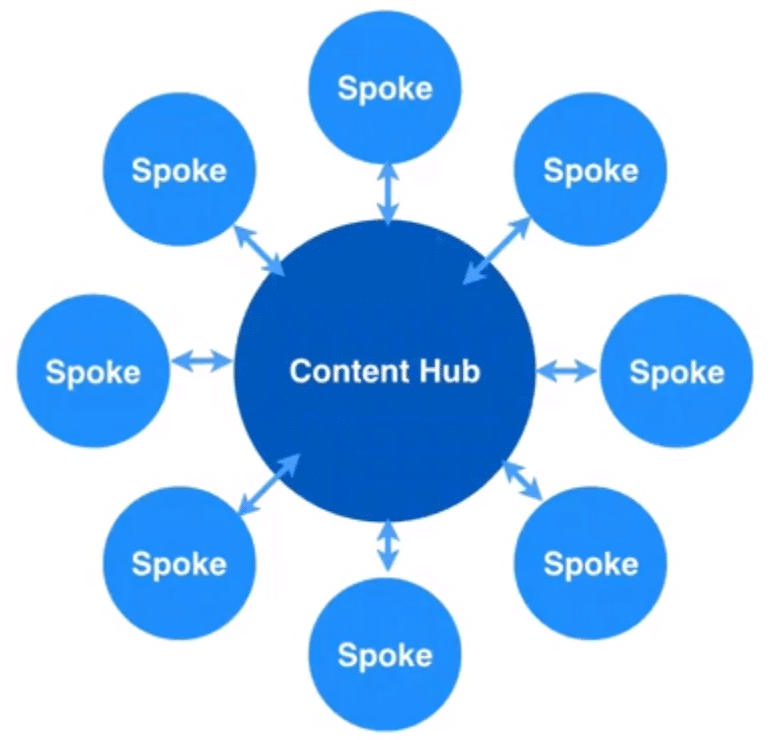
This pattern gives you centralized control over traffic, a single inspection point for east-west traffic, and a clean separation between workload environments. The problem is that implementing it on AWS looks nothing like implementing it on Azure, which looks nothing like GCP.
Crossplane is a CNCF project that extends Kubernetes to provision and manage cloud infrastructure. The key idea is that you define your own platform APIs using Composite Resource Definitions (XRDs), and then write Compositions that tell Crossplane how to map those APIs to actual cloud resources.
The three-layer model is what makes this work:
| Layer | What It Is | Example |
|---|---|---|
| XRD | Your platform API contract | XHubNetwork, XSpokeNetwork |
| Composition | The mapping to cloud resources | AWS: VPC + TGW; Azure: VNet + peering |
| Managed Resources | The actual cloud infrastructure | VPC, TransitGateway, VirtualNetwork |
From a developer or platform consumer perspective, you interact only with the top layer. You declare what you want, a hub network with these CIDR blocks in this region, and Crossplane figures out what that means in each cloud.
This project defines two abstractions: XHubNetwork and XSpokeNetwork. Both are versioned Kubernetes CRDs with an openAPIV3Schema that enforces structure and validation.
Here is the XRD for XHubNetwork:
apiVersion: apiextensions.crossplane.io/v2
kind: CompositeResourceDefinition
metadata:
  name: xhubnetworks.network.platform.io
spec:
  group: network.platform.io
  names:
    kind: XHubNetwork
    plural: xhubnetworks
  versions:
    - name: v1alpha1
      served: true
      referenceable: true
      schema:
        openAPIV3Schema:
          description: >
            XHubNetwork provisions the central hub network for a hub-and-spoke
            topology. Select the cloud provider by setting compositionSelector
            labels: provider=aws | azure | gcp.
          type: object
          properties:
            spec:
              type: object
              required:
                - parameters
              properties:
                parameters:
                  type: object
                  required:
                    - region
                    - cidrBlock
                  properties:
                    region:
                      type: string
                    cidrBlock:
                      type: string
                      pattern: '^([0-9]{1,3}\.){3}[0-9]{1,3}\/[0-9]{1,2}$'
                    # ... cloud-specific fields
The compositionSelector is the routing mechanism. You label your claim with provider: aws, provider: azure, or provider: gcp, and Crossplane routes it to the right Composition. One API, three implementations.
The status block is equally important because it outputs the provisioned resource IDs that spoke networks need to connect back:
status:
  hubNetworkId: string  # AWS: VPC ID | Azure: VNet resource ID | GCP: Network self-link
  transitGatewayId: string  # AWS only, needed by spoke TGW attachments
Here is what deploying a hub across each provider looks like in practice.
AWS — VPC with a Transit Gateway:
apiVersion: network.platform.io/v1alpha1
kind: XHubNetwork
metadata:
  name: aws-hub
spec:
  compositionSelector:
    matchLabels:
      provider: aws
      topology: hub-and-spoke
  parameters:
    region: us-east-1
    cidrBlock: 10.0.0.0/16
    availabilityZoneA: us-east-1a
    availabilityZoneB: us-east-1b
    publicSubnetCidrA: 10.0.0.0/24
    publicSubnetCidrB: 10.0.1.0/24
    privateSubnetCidrA: 10.0.10.0/24
    privateSubnetCidrB: 10.0.11.0/24
    transitGatewayAsn: 64512
Azure — VNet with a dedicated gateway subnet:
apiVersion: network.platform.io/v1alpha1
kind: XHubNetwork
metadata:
  name: azure-hub
spec:
  compositionSelector:
    matchLabels:
      provider: azure
      topology: hub-and-spoke
  parameters:
    region: eastus
    cidrBlock: 10.100.0.0/16
    publicSubnetCidrA: 10.100.0.0/27
    privateSubnetCidrA: 10.100.10.0/24
    resourceGroupName: rg-hub-network
The specs are intentionally similar. The differences (like transitGatewayAsn for AWS, resourceGroupName for Azure) are provider-specific fields that only apply to the relevant Composition. If you’re on GCP, you don’t need to know what a Transit Gateway ASN is.
Once the hub is up, spokes connect by referencing the hub’s output IDs. On AWS, that means the VPC ID and Transit Gateway ID from the hub’s status:
apiVersion: network.platform.io/v1alpha1
kind: XSpokeNetwork
metadata:
  name: aws-spoke-workloads
spec:
  compositionSelector:
    matchLabels:
      provider: aws
      topology: hub-and-spoke
  parameters:
    region: us-east-1
    cidrBlock: 10.1.0.0/16
    availabilityZoneA: us-east-1a
    availabilityZoneB: us-east-1b
    subnetCidrA: 10.1.0.0/24
    subnetCidrB: 10.1.1.0/24
    hubNetworkId: vpc-0abc1234def56789
    transitGatewayId: tgw-0abc1234def56789
    hubCidrBlock: 10.0.0.0/16
The spoke Composition creates the VPC, subnets, a TGW attachment, and the routing entries back to the hub CIDR. When you kubectl apply this, Crossplane reconciles it against the actual AWS state continuously, not a one-shot apply.
The underlying mechanics differ significantly across providers, which is exactly why the abstraction layer is valuable:
| Cloud | Hub Mechanism | Spoke Connection | Transitive Routing |
|---|---|---|---|
| AWS | VPC + Transit Gateway | TGW VPC Attachment + route tables | ✅ Yes (via TGW) |
| Azure | VNet + GatewaySubnet | Bidirectional VNet Peering | ✅ Yes (via hub) |
| GCP | VPC Network + Cloud NAT | Bidirectional VPC Peering | ❌ No |
That GCP column is worth dwelling on, but before getting into the caveat, it’s worth understanding why transitive routing matters at all.
In a real hub-and-spoke deployment, spokes almost always need to talk to each other eventually. Imagine you have three spokes: prod-workloads, shared-services, and data-platform. Each connects to the hub. Without transitive routing, this is what you get:
| Traffic Path | Works? |
|---|---|
prod-workloads → hub |
✅ |
data-platform → hub |
✅ |
prod-workloads → data-platform (via hub) |
❌ |
Your app in prod-workloads cannot reach the database cluster in data-platform, even though both are connected to the same hub. The packets arrive at the hub and go nowhere, because the hub doesn’t have a route to forward them onward to the other spoke.
Without transitivity, the hub is just a star topology for spoke-to-hub traffic. It’s not a network backbone. To make spokes communicate, you’d have to create a direct peering between every pair that needs to talk, which is the full-mesh problem you were trying to avoid in the first place.
Transitive routing solves this by making the hub an actual relay: spoke-A → hub → spoke-B works, traffic is inspected centrally, and you don’t end up with an exponentially growing list of direct peerings to maintain.
AWS Transit Gateway and Azure’s hub-spoke model both support this natively. GCP does not, and that’s the problem.
GCP VPC peering is non-transitive. This means spoke-A and spoke-B can each see the hub, but they cannot communicate with each other through the hub. The traffic simply doesn’t route. If you build this topology on GCP and expect spokes to talk to each other, you are in for an unpleasant afternoon.

The two realistic options are:
The repository documents this constraint and the migration path. Don’t ignore it if GCP is in scope.
The project supports two workflows.
You can validate compositions locally using a kind cluster with fake credentials. This lets you catch schema validation errors and composition logic issues without provisioning anything:
# Install kind and create local cluster
kind create cluster --name crossplane-local

# Install Crossplane
helm repo add crossplane-stable https://charts.crossplane.io/stable
helm install crossplane crossplane-stable/crossplane --namespace crossplane-system --create-namespace

# Apply XRDs and Compositions
kubectl apply -f apis/xhubnetwork/
kubectl apply -f apis/xspokenetwork/

# Apply an example (validates against schema locally)
kubectl apply -f examples/aws/hub.yaml
This is genuinely useful, CI pipelines can validate that your XRD schema and Composition structure are correct before any cloud credentials are involved.
For a real deployment, the sequence is:
ProviderConfig resources with your cloud credentials (stored as Kubernetes secrets)apis/examples/*/hub.yamlexamples/*/spoke.yaml, referencing hub output IDsThe cluster/install/ directory has the Crossplane and provider installation manifests. The cluster/config/ directory has the ProviderConfig templates for each cloud, fill in your credentials and apply.
The architecture pattern here is more interesting than just “networking as code.” What you’re actually building is a platform API, an internal abstraction that your teams consume without needing to know which cloud they’re running on.

Platform teams can evolve the Compositions (update the AWS Transit Gateway version, change the Azure subnet layout) without changing the API that consumers use. Workload teams just declare what they need and the platform delivers it. That separation is exactly what makes platform engineering scalable, and Crossplane is one of the few tools that makes it practical to implement on top of Kubernetes without writing a control plane from scratch.
The networking use case is a good starting point because it’s concrete, it has clear before/after states, and the multi-cloud inconsistency is painful enough that the abstraction actually earns its complexity.
March 2026 came and went. ingress-nginx is archived, no patches are coming, and the CVEs are already stacking up. If you didn't migrate yet, this is your wake-up call.
A practical guide to implementing enterprise-grade observability using OpenTelemetry, distributed tracing, and Infrastructure as Code
Designed for resilient, efficient cloud workloads